Showing posts with label Innovation. Show all posts

Thursday, 3 June 2021

How to use FLIPGRID for Speaking Lessons?


What is Flipgrid? 

Flipgrid is a website that allows teachers to create and  facilitate video discussions. Teachers can create  groups for each classroom and in each group teachers can post questions or topics of discussions. Students can respond to the questions and topics by responding through video responses that appear in a display. The videos can be shared with classes, small groups, or any collection of users interested in a common strand of questions. However, in order to protect my students' privacy I have made the setting private and the video responses sent by my students are only available for viewing and commenting by peers from their own classes. 

What do I use Flipgrid for? 

I find Flipgrid to be a student - friendly application and it makes my speaking lesson more interesting and interactive as I could see my students' responses via video messages in Flipgrid. This helps me to assess their speaking skills especially during the pandemic where teaching and learning is conducted via online and conducting speaking lessons online is very challenging.  Besides, making all 24 students in a class to speak during an online lesson is an invitation for disaster. Therefore, I have started using Flipgrid to facilitate learning during my speaking lessons. Flipgrid allows me as a teacher to take time to watch and listen to my students' spoken responses and also provides opportunity for them to practice their speaking skills from time to time.  (from one unit to another)

Not only has Flipgrid made it easier for me to carry out online speaking lessons with ease, it also has a large space for storage (this storage is free if you use your MOE account to register) that I could keep all my students' video responses as evidence for their learning (PBD filing purposes). Flipgrid makes it so much easier for me to organise students' tasks and keep their responses without endangering my devices.  

Records in my Flipgrid 'Teacher Account'

Another good thing about Flipgrid is that it is linked to our MOE _ DELIMA account, so teachers can actually 'import' students' name lists and monitor their video submissions via Delima account. I watch my students responses on Flipgrid and keep their scores in Delima. I also leave written or sometimes video comments at the end of their videos to help them to look into  mistakes and contents. 

The video below shows some examples of students' video responses : 


Please be reminded that students can respond via the Flipgrid with any camera - enabled device. Teachers can also set the duration of responses for the topics given. Responses can be as short as 15 seconds and the longest response can be five minutes. Another interesting feature in Flipgrid is that teachers can also enable peers to respond to their friends' videos via video replies. I have enabled this feature for students within the same classroom. 

If you are interested in using Flipgrid in your lessons, click and watch the videos below and after that you will be all set to get started! 

a) Introduction to Flipgrid - Click Here 

b) How to Teach with Flipgrid  Video 1 - Click Here 

c) How to Teach with FLipgrid Video 2 - Click Here 


Saturday, 11 July 2020

Understanding 'A Poison Tree' through Poetry Bingo!


In my previous post, I shared a poetry lesson I had with my students after the school reopened. As a follow up lesson to check how much they had understood the poem, I decided to do a poetry bingo with them. 

Zoe - Trying to get her first 'BINGO!'


The lesson was intended to check how much they had understood (formative assessment)  the poem from the previous lesson. This was done to ensure students' understanding of the poem 'A Poison Tree' and planning the 'What's next?".So, I decided to try out 'POETRY BINGO' with them. 

The reason I chose Poetry Bingo because I wanted to them to enjoy learning poetry. At the same time while maintaining social distancing in the class, they could do something fun.  

Ever since they came back to school on 24 June, they did not get the opportunity to move and do exciting activities as teachers were worried that they might be reprimanded for not following the S.O.P. and I also sensed growing restlessness and boredom as a result of being confined to their seats all day.  So, I decided to plan activities that were both fun and do not require them to move from their places.........   

......and I started looking for activities from the old literature modules. (they are really old. I mean who would still be keeping modules from 'The Drover's Wife' generation? I do as they come in handy at times) That was when I bumped into 'POETRY BINGO'. 

'Poetry Bingo' is not something new. In fact, teachers who had attended the 'CEFR- Aligned Formative Assessment Workshop' in 2018, would have come across this activity. Just dig your files and you may find it, just like how I found it in an old literature module.... 

So, this is how the lesson was carried out : 

Students were given an empty bingo sheet and they were required to fill in 9 words from a list of words from the poem A Poison Tree. The word list was given as well.  Once they had filled in the words, I read the meaning of the words and they had to identify the meaning. If you are teaching the weak or very weak students, you may discuss the meaning of the words with them and help them to identify the words but if you are dealing with above average group,  reduced support will do. 

Students were told that if there was a BINGO, they were to stand and shout out 'BINGO!'. They may continue doing so when they get the second, third and fourth BINGO. 

Kalai Malar- trying to make her 'Bingo' sheet as 
colourful as possible


I continued the activity till everyone got a BINGO, till the last word. 

After completing the word level BINGO, I continued with a second round, which was more difficult compared to the earlier one. In this round, they were given a list of lines from the poem and they were to choose 9 sets to fill in the bingo box. 

The second round was about making interpretations of the lines in the poem. So, I read the interpretations and they had to identify from the lines - whether they had written in the box or left them outside. In this round, I chose to read the interpretations of the 10 most difficult lines in the poem. This was because, I was very sure that they would only fill in the bingo boxes the lines they had understood the best and ignore the difficult ones; true enough, that was what they exactly did! I did not want them to shy away from the difficult lines, so I picked the difficult ones.

However, it was not completely difficult as I made the interpretations easier with 'clue words' for them to understand. There were more clue words for the weaker ones and less for the good ones. 
Some students got back to back bingos!


After completing this activity, I moved to the SPM based activitiy which was a breeze, students could answer the questions effortlessly.  You may download the 'Poetry Bingo' activity task sheet here. 

Chong Chi Rou - attempting the SPM type literature
questions after the 'Bingo' activity


The following video shows how the 'Poetry Bingo' activity was done in my class : 


Tips: 

Do not try a third round of BINGO. It will not work, the excitement dies after the second round. So stop after the second round and try something else. 


Happy Teaching!

Saturday, 4 January 2020

Ready to Print Exit Cards!!


Exit cards are often used in post - lessons to get students to summarise the lesson learnt or to display what they have understood at the end of a lesson. Exit cards can be in many different forms and teachers can actually design their own exit cards based on what is relevant for their lessons. 

After referring to some online and offline resources,  I have prepared different types of exit cards which I am planning to use in my lessons and I thought of sharing them here. Exit cards can provide us with immediate information that we can use to assess our students' understanding, monitor their progress and to gather feedback on our own teaching. Exit cards do not only help us to assess our students but it is also a way for us to reflect our own teaching practices. The following are some of the exit cards that I am sharing here. 

a) Summarising the lesson


This is an interesting way to summarise the lesson. If you are having a speaking and listening task, you may want your students to reflect whatever they have listened and spoken in a written form. This exit slip can be a great way to reflect whatever learnt during listening/speaking lesson. 

b) Writing the summary of a lesson and listing new words


Besides summarising, if you are exploring new vocabulary in your lesson, this exit card will be a suitable one. This will help us to assess students' vocabulary gain at the end of the lesson. 

c) Answering simple questions


We can also use exit cards with three simple questions. I think this exit card will be suitable when we teach grammar. This will help students to reflect on new grammar rules that they learn. Undeniably this can also be used for other lessons. Look at the questions and think whether the exit card is relevant for your lesson before using it or else students will return empty papers. 

d) 3 - 2 - 1 


This is a common exit slip that can be used in almost all lessons but remember not to use it too often as students will get bored doing the same thing. A little variety will spice up things and help students to put on their thinking caps.  I have used this particular exit slip many times in previous years and not planning to use it this year.  

e) Reflection slip


When you use this exit slip, you are actually giving your students the liberty to decide whether or not they like the lesson. So, if you want your students to assess your lesson, this is one simple and quick way. 

f) Your opinion matters 


This is another exit slip where students are required to form an opinion around the topic discussed and they are to give relevant details to back up their opinion. This exit slip will be suitable when we are discussing topics related to certain issues, just like the reading task in unit 1 in the form 4 textbook where it discusses issues related to social networking sites. 

You may download the ready to print pdf version of the exit slips here. You may print in coloured papers of your choice. 

Happy Teaching!!! 


Friday, 3 January 2020

Reading Activity - Full Blast Unit 1


I began my lesson this year with a reading activity. This lesson is based on the 'Full Blast!' textbook, page 8.  I did not try anything ambitious as my intention is to develop my students reading skills using simple activities that will work for everyone, especially for my students. 

So, this was how the lesson went : 

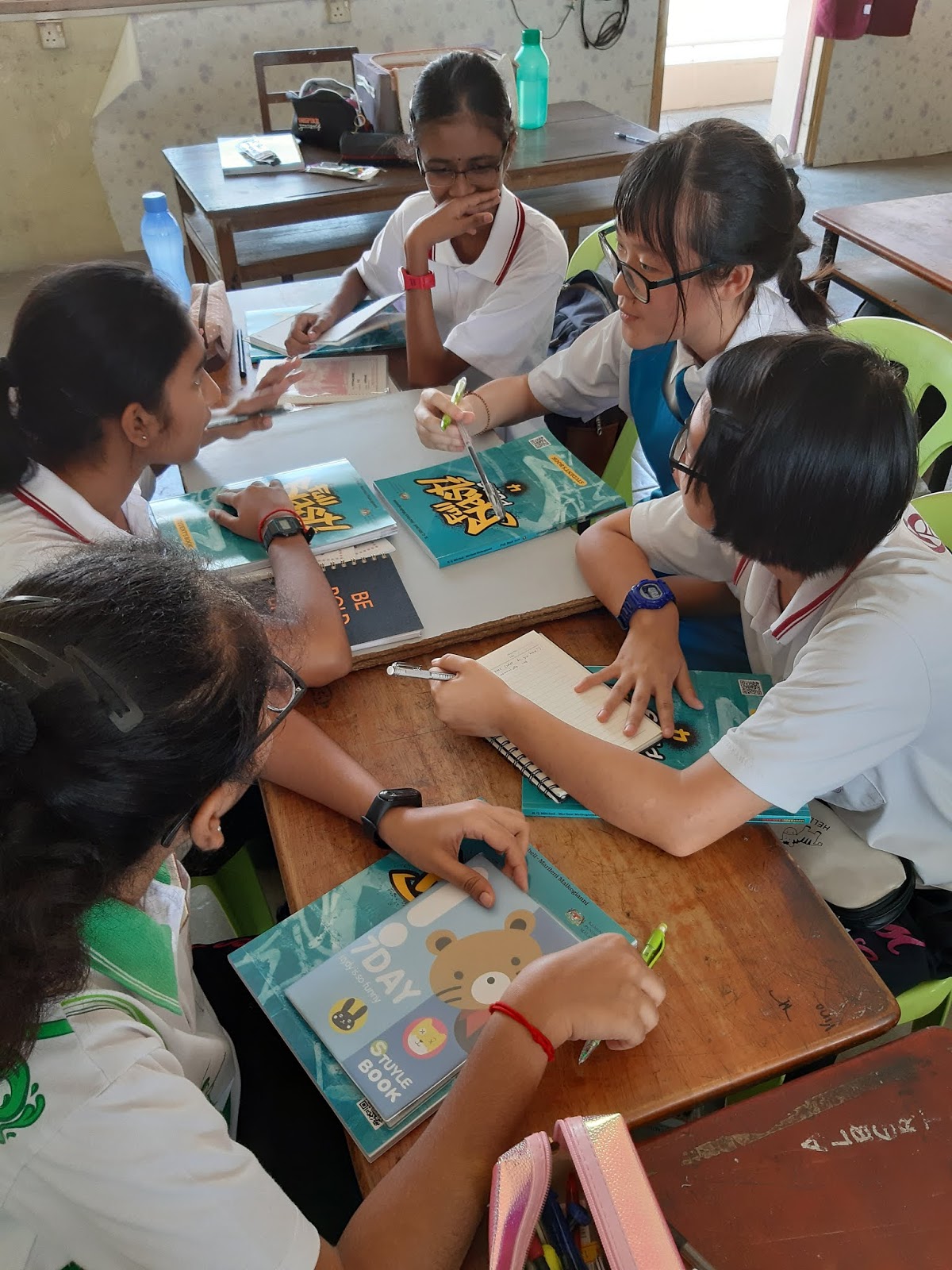
Before I began the lesson, I put my students into small groups and they remained in the same groups throughout the lesson.  

For the pre-reading activity, I wanted to activate students prior knowledge on social networking sites(SNS), so students were given three questions to be discussed in their groups. After discussion, each group choose a representative to share the outcome of the group discussion. The sharing session then led to the next activity. 
The first round of discussion is in progress 

For the next activity, students were required to read the text assigned to them individually. There were four students in a group and each of them was assigned one section of the text. I also prepared supplementary task sheets to help them with the reading activity. You may click here to download the task sheet. As they read, students were required to fill in the necessary information in the task sheet provided and share them during the discussion with the rest of the class. They were required to identify the opinions of each individual about SNS in the text and together with the opinion they were also identified reasons given for the opinions. After completing the task,  students exchanged their answers with members from other groups.
Students completing tasks given in the supplementary task sheet while reading the text.

Students completed the supplementary task individually before discussing as a group

A student sharing opinion  and reason 

Upon completing this, I drew students attention to the next activity in the task sheet, where they have to read through the entire text again as a group to identify the advantages and disadvantages of SNS. Again, to save time I asked them to complete the task in their respective groups. After completing the table, students were asked to shout out their answers for the teacher's approval. This activity is followed by task C and D in the student's book. 

Students found it easier to complete task C and D in the textbook as they had read the text more than twice and understood the opinions of each individual in the text through the supplementary task. 

The next activity was speaking, due to time constraint, students were required to stay put in the same groups. I used talking chips so that students will be focussed and know their roles. Each student was given 8 chips. The chips have three different colours. Two pink chips for questioning, three blue chips to respond to a statement/question/answer and three yellow chips for them to state their opinions. The speaking task was very organised due to the use of the talking chips. 


Students are engaged in speaking task using the talking chips.


As a closure for this lesson, a few students were randomly picked using ice-cream sticks to share what they have learnt today. 

Happy Teaching!!!


Thursday, 19 December 2019

Classroom Tools for Writing Lessons


The following are some tools that can be used during our writing lessons to enable our students to assess their own and peers' compositions before handing them in to the teacher. These rubrics have been designed in a way to make our students check for simple errors before submitting their work. 

Self - Assessment Rubric 
The self - assessment rubrics are designed to help students to check their own essays before submitting them. The rubrics here have listed a set of 'to-do' things that guides students to check their work. The lists are simple and understandable. Students can easily figure out what they have done and what they need to improvise before submitting the final work. As for the teacher, it would be easier for them as they would only need to work on the technical parts. The three editing checklist that I have shared here are different in their own ways. We can always alter and make minor changes to them so that the rubrics are well - aligned to the task given to the students. 

Self - Assessment Rubric 1 


Self - Assessment Rubric 2 


Self - Assessment Rubric 3 

Peer Assessment Rubric
The following are different types of peer assessment rubrics. These are different types of tools for different types of writing tasks and involves one or two peers as assessors depending on the task given. I have constructed these rubrics as simple as possible so that my students would understand what is stated in the rubrics. However, if you find them to be too difficult for your students you can always simplify these rubrics to suit your students learning needs.  


Peer Assessment Rubric for Descriptive Writing 

Peer Assessment Rubric for Paragraph Writing

Peer Editing Checklist

Peer Assessment Rubric 

Peer Grading Rubric
Teacher Assessment Rubric 
The teacher assessment rubric is designed for teachers to assess their students' work and give them scores for six different criteria and each criterion has three scores to show students what they have achieved and what they have to work on. This is in a way replicating the medal and mission model. 

Teacher Assessment Rubric - First Page 

Teacher Assessment Rubric - Second Page

You may download the rubric here. 

Happy Teaching! 

Friday, 30 June 2017

Digital Tools for Language Learning

In the 21st century classrooms today,  digital tools should coexist with traditional tools. There are a mixed bag of online tools exist today that students do not need to rely only traditional tools anymore. The online tools are not only free but they are easily accessible and time saving. Besides, online tools provide wider and more precise information compared to the traditional tools. They allow teachers to plan interactive lessons based on specific themes and topics.

A website that provides a wide range of creative phrases. I use this website very often to look for creative phrases, especially for writing. I have also introduced this to my students and they find this site to be very helpful.  You can also find a plethora of vocabulary activities, online test and classroom ideas here!     

I introduced this site to my students so that they can effortlessly look for alternative words and their meanings. I find this web to be both reliable and user – friendly.

Many teachers in Malaysia have been exposed to Kahoot and are using it very often. Kahoot is a user – friendly tool for designing in – class questionnaires and quizzes. Teachers can design  quizzes, surveys or questionnaires to test the knowledge of their students on a topic. Kahoot is an interactive tool that promotes interactive and fun learning environment. Besides, Kahoot also allows teachers to get a better understanding of where their students stand while the students are engaged in a fun learning experience.

Socrative is just another online tool created for interactive quizzes and questionaires just like Kahoot. However, it is less colourful and more suitable for matured students.

Language tool is an online grammar checker that helps in proofreading. All you need to do is simple type a paragraph in the textbox and it will highlight all the errors from spelling to grammar problems.

This page produces children’s educational web sites which are designed to capture the imagination while maximizing creativity, learning, and enjoyment. This page is very user – friendly and one can learn very fast. The page is designed to help young learners, therefore it has the simplest computer interface and the clearest instructions. The pages also has several educational materials that help to enhance creativity and promote fun learning.

Lexipedia is a simple virtual thesaurus. All you have to do is to type any word and it will display all the words that can be associated with the target word. The words are also colour coded  according to their types and it also gives complete definition for the displayed words.

Snappy Words 
Just like lexipedia, Snappy Words is another visual thesaurus. Teachers can actually introduce a few thesaurus tools to students so that they can pick and choose the one that works for them


.

Shahi is a visual dictionary that combines pictures from Flickr and other similar pages. I think this is a great tool for English language learning.


Lingro  
Lingro is a very useful tool and I find it to be interesting. All you have to do is just type on the Lingro website and it will take you the web where you can click on any words on the web and it will translate the text/word in 12 languages. All you have to do is to simply click on any words and several definitions will be displayed. This is a very helpful too that will be very helpful to struggling ESL learners.

ThingLink is a tool for making interactive images. Teachers could us ThingLink to teach students key vocabulary or students could design interactive images with the vocabulary provided. Anyways, there are just many ways that one can use ThingLink.

I am sure all of us are aware of Wordle. Just like Wordle, Wordsift id just another tool where students type or copy and paste text and Wordsift will just sort them out based on word frequency. However, Wordsift has additional visual thesaurus displayed. With the visual thesaurus, students immediately see how words are grouped semantically. 

Sunday, 22 June 2014

Innovative Teacher Competition 2014


My mighty wheels of English was again presented  during the Perak State level Innovative Teacher Competition 2014. I have made a few changes to the wheels to improvise it and to make it more presentable. I have also brought examples of lessons that utilised the use of Mighty Wheels of English. I was very elated when the innovation finally earned a bronze award.


Related Posts Plugin for WordPress, Blogger...